
Automated QA
Automated Quality Assurance on 100% of your customer conversations.
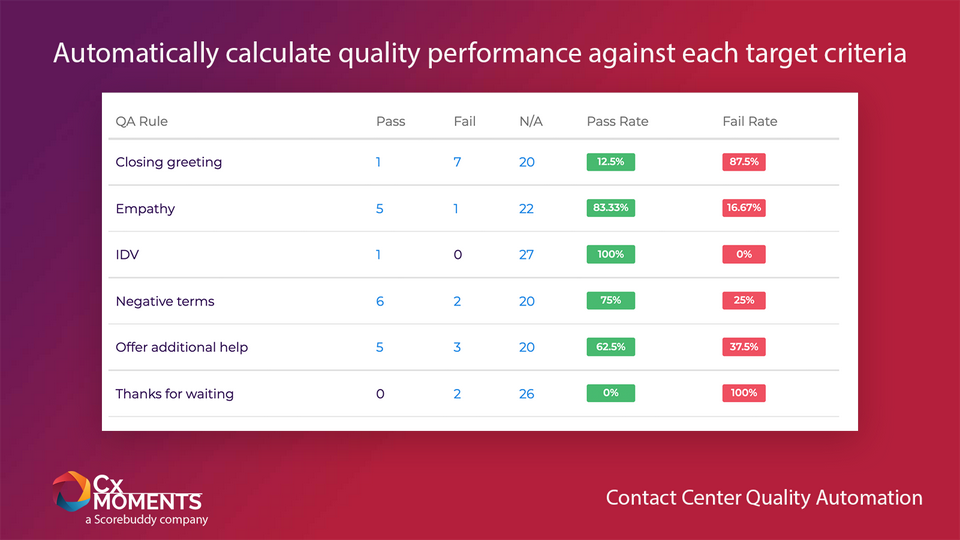
Cx Moments Automated QA automatically evaluates 100% of your agents conversations against behaviour and compliance objectives tailored to your own business, such as delivery of branded greetings, empathy, and regulatory compliance.
Manual Quality Assurance processes evaluate less than 2% of your agents conversations, sometimes sanctioning them for one single mistake they made. Instead, Quality Assurance should be a constructive engagement with support agents, reviewing both good behaviours and weaknesses that need improvement. Unfortunately, manually evaluating a handful of conversations with each agent will not achieve this.
Cx Moments Automated QA makes this possible by analysing 100% of your agents conversations. It gives instant access to hundreds of chats that passed or failed specific behaviour or compliance criteria, tailored to your own business requirements.
By showing success trends for each agent and each QA criteria, and giving instant access to marked-up conversations supporting these scores, Cx Moments transforms the QA process into a best-in-class coaching engagement opportunity.
Key Features
Use Cx Moments NLP AI to rapidly discover word patterns in your customer-agent conversations and use them to track customer problems, agent empathy, branded greetings or regulatory disclaimers.
Combine these word patterns using simple logical rules that can be easily configured in just a few clicks. No PhD in Quality Automation required! Any QA evaluator can create new rules in a few minutes to define specific patterns that deserve a QA check.
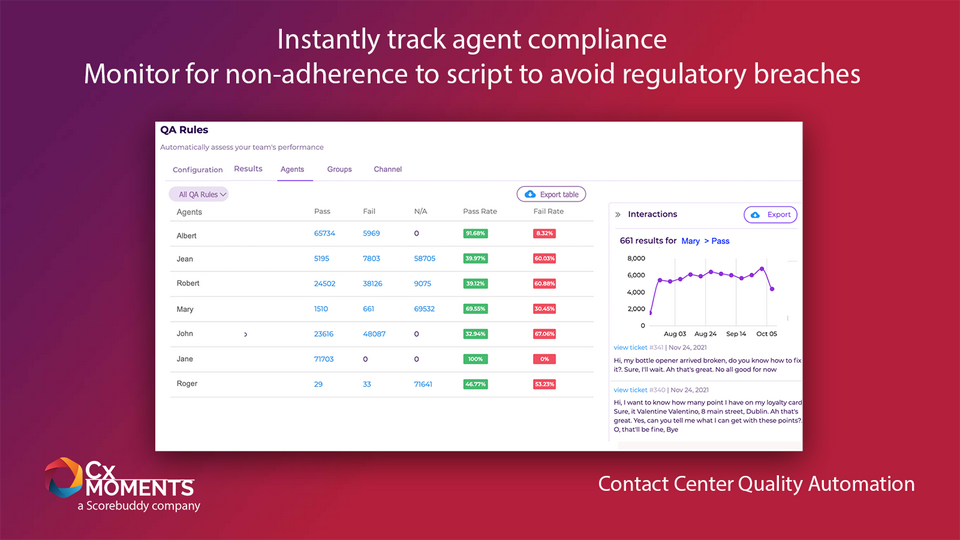
Instantly see how each QA rule, each agent group, and each agent are performing in terms of pass/fail rate.
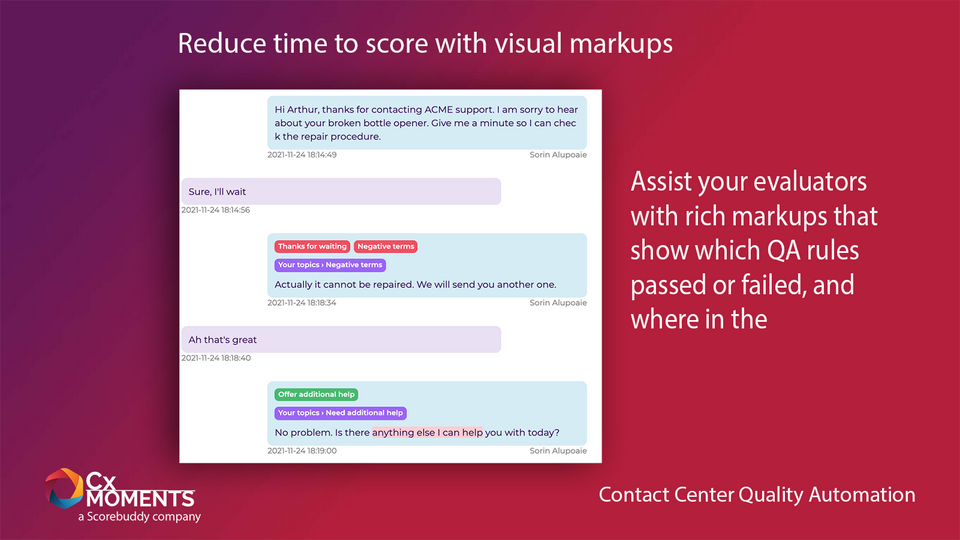
With one-click conversation drill-down, Cx Moments Auto QA will instantly show in a marked-up view which QA rules passed or failed, where in the conversation, and why.
Benefits
Assist your quality evaluators with rich markups that show where, in each conversation, the Auto QA rules passed or failed. Highlight in one-click the agent’s keywords or phrases that triggered these results.
Monitor all your agents across 100% of their conversations for non-adherence to script. Cx Moments Auto QA helps avoid regulatory breaches that may result in penalties.
Easily create customized QA criteria with simple logical rules to measure your agents’ brand compliance, regulatory compliance and behavior objectives:
- Do customer support agents correctly use your specific branded greetings?
- Do they show empathy when customers share problems or distress?
- Do they use the required disclaimers and T&Cs?
- Do they avoid banned vocabulary such as inside jargon or negative terms?
- View Pass and Fail rates for each Auto QA rule
- Trend performance against compliance, best practice, and behavior guidelines
- Navigate your reports by date ranges, filter per agent groups, brands or channels.
- Export your reports in one click for analysis in other platforms
App Terms
Legal Terms
By installing this app, you agree to the Marketplace Terms and App Privacy Policy.